


Matrices are essential in algebra, linear equations, and higher-level mathematics. Fortunately, a TI-84 calculator can perform a wide range of matrix operations. From adding and multiplying matrices to finding their inverse, this device can do it all.
In this guide you will learn how to use matrices on a TI-84 calculator, including how to add, subtract, multiply, find inverses, and determinants. You can also use a TI-84 calculator online to practice these matrix operations.
Before performing calculations, learn how to use a TI-84 calculator online to enter matrices. First press 2nd and then MATRX. After that, select EDIT and choose a matrix, for example A. One should also set its dimensions, which refers to the number of rows and columns.
Then, enter the values and do not forget to press the ENTER key after each element. It is also possible to store several matrices on a calculator, such as A, B, and C. When using a graphing calculator online, it will also be possible to perform matrix addition and other operations.
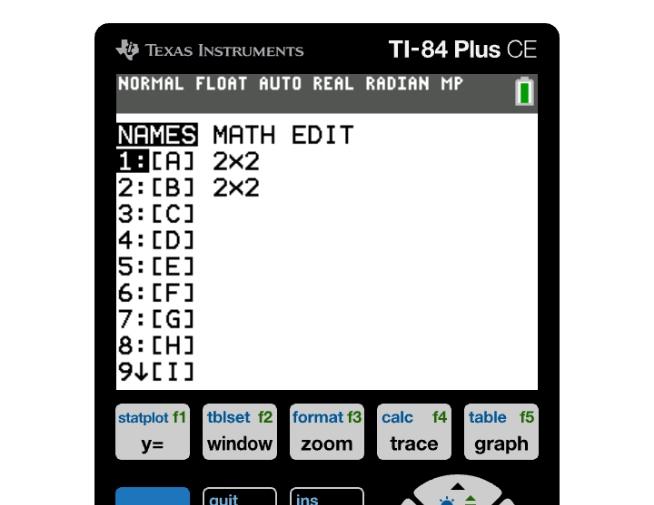
Matrices can only be added and subtracted if they have the same dimensions. For instance, two 2×2 matrices can be added and subtracted.
To proceed, return to the home screen first (press 2nd → MODE if needed), then press 2nd → MATRIX to open the matrix menu. After that, go to NAMES, choose A, then press + and go to MATRIX → NAMES again to choose B. Press ENTER to see the result. Finally, pressing the ENTER key will give the result.
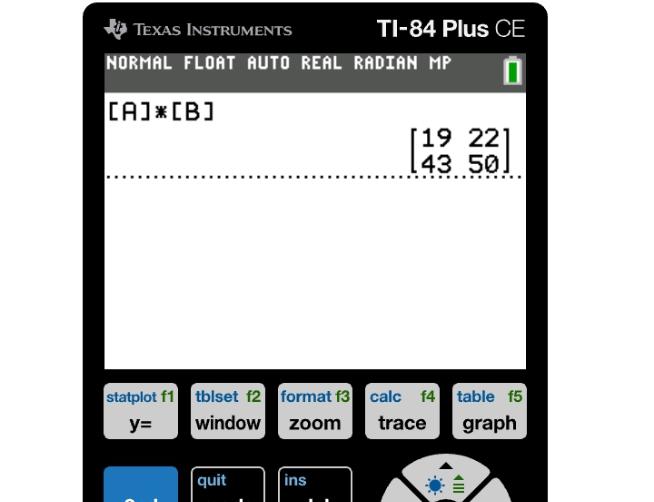
Unlike addition and subtraction, matrix multiplication is only possible when the number of columns in the first matrix is equal to the number of rows in the second matrix. For example, a 2×3 matrix can be multiplied by a 3×2 matrix.
So, one should use the MATRIX button again, go to NAMES, choose A, and then return to the home screen. Then, repeat the same steps for B, but this time, use the × sign.
Operation | Requirement | Ti-84 Function |
Addition | Same dimensions | [A] + [B] |
Subtraction | Same dimensions | [A] – [B] |
Multiplication | Compatible dimensions | [A] × [B] |
Inverse | Square, non-singular matrix | [A]⁻¹ |
Determinant | Square matrix | det(A) |
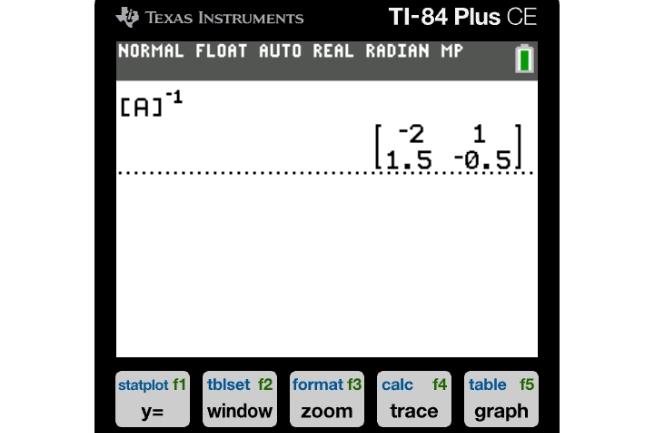
To find the inverse of a matrix on TI-84, remember that it must be square. In other words, the number of rows should equal the number of columns. If the determinant is zero, the inverse matrix does not exist.
Therefore, after entering the matrix, one should go to the home screen and choose the MATRIX button again. Then, go to NAMES, pick A, and return to the home screen once more. Now, it is needed to press the x⁻¹ button and then ENTER.
The determinant is a scalar value that can be defined for square matrices. It is primarily used to find out whether a matrix is invertible or not. To find the determinant of a matrix on TI-84, one should choose det( from the MATRIX menu.
After that, return to the home screen, go to NAMES, and pick A. Again, use the ENTER key, and the calculator will give the result. You can perform this same det( function directly in our TI-84 calculator online, with identical results
While working with matrices, it is important to avoid common mistakes that could occur. First of all, when entering matrices into a calculator, it is important to pay attention to the dimensions of the matrix. Moreover, if there are several matrices, it is important to check if the correct matrix is selected.
While working with multiplication, it is important to remember that only matrices with compatible dimensions can be multiplied. It is also essential to pay attention to the determinant while looking for an inverse matrix and checking if it is equal to zero or not.
In conclusion, a TI-84 calculator can be a great tool for those who need to perform various matrix operations. Having learned how to use a TI-84 calculator, one will be able to add and subtract matrices, multiply them, and find their inverse, determinant, and other values.
Yes. As long as the number of columns in the first matrix matches the number of rows in the second. For example, a 2×3 matrix can be multiplied by a 3×2 matrix, but not the reverse.
After entering the matrix, go to the home screen, press 2nd → MATRIX, go to NAMES, and choose A. Then press x⁻¹ and ENTER.
The reason why a TI-84 calculator cannot find a matrix inverse is that it is singular. It means that the determinant is zero, so one should use the det function.
One can use a TI-84 calculator online because it has all the necessary functions.
A TI-84 calculator can perform matrix addition, subtraction, multiplication, and other operations.

Probability becomes easier when you know which functions to use on your TI-84 calculator. The calculator has several functions that can simplify probability and...
A list of numbers may seem innocuous until a statistics problem asks you to find three different results from it. The mean is familiar, but median and standard ...
TI-84 Calculator Online, along with the TI-83 Plus, TI-89 CAS graphing calculator, online graphing calculator and TI-30XS scientific calculator, provides students with versatile digital tools for solving equations, plotting graphs, and handling complex math problems. These calculators can be used directly in any browser without installation, making them perfect for math and science students looking for quick and easy solutions.


© 2026 — Revision. All Rights Reserved.